A great animation video starts with a great script. Not the visuals. Not the voiceover. Not the animation style. The script.
You can have the smoothest 3D animation in the world, but if the script is unclear, off-message, or pitched at the wrong audience, the video will not convert. On the other hand, even a basic 2D animation with a sharp script can outperform a high-budget cinematic video — because viewers do not buy animation. They buy the message the animation carries.
This guide walks through exactly how to write an animation video script that converts in 2026 — with templates, word counts, real US examples, and the proven structure used by SaaS brands, ecommerce companies, healthcare brands, and B2B teams across the United States. Whether you are writing your first explainer script or refining the tenth draft of a product launch video, this guide will help you cut the fluff, sharpen the hook, and write a script that actually drives action.
What Is an Animation Video Script?
An animation video script is a written document that defines exactly what will be said, shown, and heard in an animated video — line by line, scene by scene. It is the blueprint that the animation team uses to build the storyboard, design the characters, time the voiceover, and finalize the visual style.
A complete animation video script usually includes:
- The voiceover narration (what will be heard)
- Scene descriptions (what will be shown)
- On-screen text or callouts (what will appear visually)
- Sound design notes (music cues, sound effects, pauses)
- Timing markers (how long each section runs)
Without a finalized script, the animation process gets expensive fast. Revisions at the animation stage cost 10 times more than revisions at the script stage. This is why every professional animation studio in the US insists on script approval before a single frame is animated.
How Long Should an Animation Video Script Be?
The length of your animation video script directly controls the length of your final video. The standard ratio used by US animation studios is:
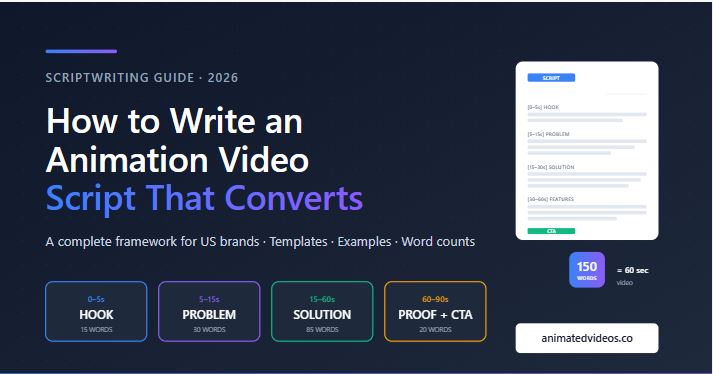
150 words of script equals approximately 60 seconds of video.
This assumes a natural voiceover pace of around 150 words per minute — the sweet spot for clarity and engagement. Faster than 160 wpm feels rushed. Slower than 130 wpm feels dragged.
Here is a quick reference for the most common animation video lengths in the US market:
| Video Length | Script Word Count | Best Use Case |
|---|---|---|
| 15 seconds | 35 – 40 words | Social ads, Instagram Reels, TikTok |
| 30 seconds | 70 – 80 words | Paid social, YouTube pre-rolls, Amazon |
| 60 seconds | 140 – 160 words | Landing pages, explainer videos, sales decks |
| 90 seconds | 220 – 240 words | Product launches, SaaS demos, B2B explainers |
| 2 minutes | 290 – 320 words | Training videos, healthcare, education |
| 3 minutes | 440 – 480 words | Long-form training, course content, deep explainers |
The 6-Part Animation Video Script Structure That Converts
Every effective animation video script in 2026 follows the same proven structure. This is not a creative restriction — it is a framework that has been tested across thousands of US product launches, SaaS explainers, and B2B videos. Skip any of these six parts, and conversion drops.
Part 1: The Hook (First 3 to 5 Seconds)
The first three seconds decide whether the viewer keeps watching or scrolls away. Your hook needs to either name the problem clearly, ask a sharp question, or make a bold statement that earns attention immediately.
Weak hook: “Welcome to Acme Software, the leading platform for businesses.” Strong hook: “Most small teams waste 12 hours a week on invoicing. Acme fixes that in 30 seconds.”
The strong hook works because it is specific, problem-focused, and promises a benefit before the viewer has time to lose interest. The weak hook is generic and self-focused, which signals “marketing video — skip” to the viewer’s brain.
Part 2: The Problem (Seconds 5 to 15)
Once you have the viewer’s attention, build on the hook by expanding the problem. Make the viewer feel the pain point. Use specific language they would use themselves.
The mistake most US brands make here is staying too abstract. “Inefficient workflows” is abstract. “You are still copy-pasting customer details into three different tools” is specific.
If you cannot describe your customer’s exact pain point in one sentence using their own words, you do not know your customer well enough to write the script yet.
Part 3: The Solution Reveal (Seconds 15 to 30)
This is where your product or service enters the story. Introduce it by name, show what it does in one clear sentence, and connect it directly back to the problem you just described.
Weak solution reveal: “Acme is a comprehensive workflow management platform built for modern teams.” Strong solution reveal: “Acme connects your invoicing, CRM, and email in one tool, so you stop copy-pasting and start closing.”
The strong version names a real outcome. The weak version describes a category. Categories do not convert — outcomes do.
Part 4: The Features and Benefits (Seconds 30 to 60)
Now show 2 to 3 reasons why your solution works. Not 7. Not 5. Two or three at most. Every additional feature dilutes the message and drops viewer attention.
For each feature, follow the pattern: what it does + why it matters to the customer.
Weak features section: “Acme has automation, integrations, and reporting.” Strong features section: “Set automated rules once and Acme handles your billing forever. Connect it to QuickBooks, Stripe, or Salesforce in two clicks. Get a real-time view of cash flow that updates as money moves.”
The strong version uses verbs, names real tools your audience recognizes, and connects every feature to a concrete benefit.
Part 5: The Proof (Seconds 60 to 75)
Even a strong video needs a credibility marker before the call to action. Without proof, your claims feel like advertising. With proof, they feel like recommendations.
Effective proof elements for animation video scripts include:
- A customer count: “Trusted by 12,000 US small businesses”
- A specific result: “Customers save an average of 11 hours per week”
- A recognizable client name: “Used by teams at HubSpot, Notion, and Webflow”
- A trust signal: “Built by ex-Stripe engineers” or “SOC 2 compliant since 2023”
- A guarantee: “Cancel anytime. No setup fees. 30-day refund.”
Pick one. Do not stack three proof statements together — it sounds insecure. One strong proof point lands harder than three weak ones.
Part 6: The Call to Action (Last 5 to 10 Seconds)
End with a clear, single, action-focused instruction. Not two. Not “visit our site or call us.” One specific action.
Animation Video Script Template (60-Second Version)
Here is the exact template the script structure produces, ready to fill in for any 60-second animation video. Word counts are calibrated to the 150-words-per-60-seconds standard.
[0–5 seconds] HOOK (15 words)
Open with a sharp problem statement, question, or bold claim that earns attention.

[5–15 seconds] PROBLEM (30 words)
Describe the specific pain point in the viewer's own language.
Make them feel the cost of not solving this.

[15–30 seconds] SOLUTION REVEAL (35 words)
Introduce the product by name.
State exactly what it does in one clear sentence.
Tie it back to the problem.

[30–60 seconds] FEATURES & BENEFITS (50 words)
Three core features.
Each one: what it does + why it matters.
Use verbs. Name tools. Show outcomes.

[60–75 seconds] PROOF (15 words)
One credibility marker — customer count, result, client name, or guarantee.

[75–90 seconds] CALL TO ACTION (5 words)
One specific action. One destination. Remove friction.
This template totals approximately 150 words and runs around 60 seconds with a professional voiceover at standard pace. For a 90-second video, expand the features section to 80 words and add a brief context line after the hook.
Real Example: SaaS Explainer Video Script (60 Seconds)
Here is a complete 60-second animation video script written using the framework above, for a fictional US SaaS product called Stacked, an invoicing tool for freelancers.
[0–5s — HOOK] If you freelance in the US, you have probably chased an unpaid invoice this month.
[5–15s — PROBLEM] The average freelancer in the US waits 41 days to get paid. That is rent, groceries, and tax payments stuck in someone else’s accounting queue.
[15–30s — SOLUTION REVEAL] Stacked sends professional invoices in 30 seconds, automatically follows up on late payments, and reminds your clients the moment a payment is due — without you lifting a finger.
[30–60s — FEATURES & BENEFITS] Send beautiful, branded invoices straight from your phone. Automatic late-payment reminders that sound polite, never pushy. Real-time dashboards that show exactly what you have earned, what is pending, and what is overdue — so tax season stops being a panic.
[60–75s — PROOF] Trusted by over 30,000 US freelancers and rated 4.9 on G2.
[75–90s — CTA] Start free at stacked.com. No card required.
Total: 152 words. Final video length: approximately 60 to 65 seconds.
This is the structure that converts. It is not creative writing — it is direct, specific, and built around what the viewer needs to know to take action.
Common Mistakes US Brands Make in Animation Video Scripts
After reviewing hundreds of US animation video scripts across SaaS, healthcare, ecommerce, and B2B, the same mistakes appear again and again. If your script falls into any of these patterns, conversion will suffer.
1. Starting with the company instead of the customer
“At Acme, we are passionate about helping businesses grow” is a fatal opening. The viewer does not care about Acme yet — they care about themselves. Open with their problem, not your company’s mission statement.
2. Cramming too many features
A 60-second animation video script has room for 2 to 3 features. Brands trying to fit 7 features into 60 seconds end up with a video that explains nothing well. Pick your strongest three and cut the rest.
3. Writing in marketing language instead of conversational language
Read your script out loud before approving it. If you would never say these words in a conversation with a customer, the voiceover artist cannot say them either. “Robust, scalable, end-to-end solutions” is marketing language. “Set it up once and it just runs” is conversational language. The second one converts better, always.
4. Vague calls to action
“Learn more” is not a call to action. “Visit our website” is not a call to action. A real CTA names a specific next step and removes one objection. “Start your free 14-day trial — no credit card needed” is a real CTA.
5. Skipping the script approval step
The single most expensive mistake brands make is jumping from a rough draft into animation. Every script needs at least one full review pass — read aloud, timed, refined — before it moves into storyboard. Skipping this step almost always leads to re-animation costs later.
6. Writing for the wrong attention span
Your script needs to match the platform. A landing page script can hold attention for 90 seconds. A Meta or LinkedIn ad has 8 seconds before the viewer scrolls. A YouTube pre-roll has 5 seconds before the skip button. Write the script for where the video will live.
How to Write a Script for Different Animation Video Types
The framework above adapts based on the type of animation video and the platform. Here are the specific adjustments for the most common formats US brands order.
Animation Script for SaaS Explainer Videos
SaaS explainer videos work best at 60 to 90 seconds. Keep the problem statement specific to your buyer persona, focus the features on workflow outcomes (time saved, errors avoided, integrations supported), and end with a free trial CTA. The opening hook should name the exact pain point in your buyer’s vocabulary.
Animation Script for Product Launch Videos
Product launch scripts at 60 to 90 seconds need a stronger emotional hook because the viewer does not yet know the product exists. Lead with the result the product delivers, not the product itself. Use the first 5 seconds to make the viewer want to keep watching, then introduce the product as the answer.
Animation Script for Whiteboard Animation Videos
Whiteboard animation scripts can run longer — up to 2 to 3 minutes — because the format itself signals “educational” and viewers stay engaged longer. Use a clear instructional tone, build the explanation step by step, and let the visual hand-drawing carry the pacing. The script for whiteboard animations should read like a teacher explaining something one-on-one.
Animation Script for Motion Graphics Videos
Motion graphics scripts work best at 30 to 60 seconds for B2B and 15 to 30 seconds for social ads. The pace is fast, so every word has to earn its place. Skip transitions and connectors — let the visual motion handle the flow. The script reads more like ad copy than narration.
Animation Script for 3D Product Videos
3D product video scripts at 30 to 60 seconds focus on showing the product in use. The script should describe outcomes (what the customer can do with the product) rather than features (what the product has). Pair every voiceover line with a specific visual moment in the storyboard.
How to Test Your Animation Video Script Before Production
Before sending your script into animation production, run it through these four tests. Any script that passes all four will produce a video that converts. Any script that fails one will produce a video that underperforms.
Test 1: The Read-Aloud Test
Read the full script out loud at a natural pace. Time yourself. Does it fit the target video length? Does any line feel awkward, robotic, or like marketing language? Mark every awkward moment and rewrite it before approval.
Test 2: The 5-Second Test
Read only the first 5 seconds (the hook) to someone unfamiliar with the product. Ask them what the video is about and if they would keep watching. If they cannot answer, rewrite the hook.
Test 3: The Specificity Test
Underline every specific number, name, or detail in the script. If you have fewer than three underlines, your script is too vague. Concrete details (numbers, named tools, specific outcomes) consistently outperform abstract claims.
Test 4: The CTA Test
Read only the last 10 seconds. Is there exactly one action? Is the destination clear? Is the biggest objection addressed? If you answer no to any of these, rewrite the CTA.
Should You Write the Animation Video Script Yourself or Hire a Studio?
Most US brands fall into one of three categories when it comes to script writing:
Category 1: Marketing teams who write the script in-house. This works when the team has strong copywriting skills and deep knowledge of the customer. The risk is that internal teams often write from the brand’s perspective, not the viewer’s perspective.
Category 2: Brands that hire a freelance copywriter for the script, then a separate animation studio for production. This adds coordination overhead but can produce strong scripts when the copywriter has video-specific experience. The main risk is that scripts written without animation knowledge often miss pacing, visual cues, and timing constraints.
Category 3: Brands that work with an animation studio that handles both script and production. This is the option most US brands choose for production-ready quality. A studio that writes the script understands exactly how each line will translate to animation, voiceover, and timing — which eliminates revision cycles and protects budget.
The right path depends on your team’s experience and the stakes of the video. For low-stakes social content, in-house works fine. For product launches, SaaS explainers, and high-budget B2B campaigns, working with a studio that includes scriptwriting in the production process is usually faster, cheaper, and produces a better final video.
Get Your Animation Video Script Written by Professionals
At Animated Videos, every animation project we produce for US brands includes full scriptwriting, voiceover direction, and storyboard development as part of the production process. From 2D explainer videos and 3D product animations to motion graphics and whiteboard animations, our scriptwriters work directly with your team to build a script that fits your brand, your audience, and your goals — before a single frame goes into animation.
Send us your product details, target audience, and goal — and we will return a draft script with style recommendations within 5 business days. No long sales cycles, no template scripts, no filler.
Get a Free Script Consultation →
Frequently Asked Questions
How many words should an animation video script be for 60 seconds?
A 60-second animation video script should be 140 to 160 words, based on a natural voiceover pace of 150 words per minute. Going much higher than 160 words for a 60-second slot makes the video feel rushed, while going much lower than 140 words creates awkward pauses.
What is the best structure for an animation video script that converts?
The proven 6-part structure for an animation video script is: Hook, Problem, Solution Reveal, Features and Benefits, Proof, and Call to Action. This framework works for SaaS explainers, product launches, B2B videos, and ecommerce animations across the US market.
How long should an explainer video script be?
For most US brands, the ideal explainer video script is 60 to 90 seconds long, which translates to 140 to 240 words of script copy. This is the optimal range for landing pages, social ads, and sales decks where attention holds and conversion stays high.
Can I write my own animation video script?
Yes, you can write your own animation video script if you have strong copywriting skills, know your customer well, and understand video pacing. For high-stakes videos like product launches or SaaS explainers, working with a studio that includes scriptwriting in production usually produces stronger results and fewer revision cycles.
What software do I need to write an animation video script?
You do not need specialized software to write an animation video script. A simple two-column document with voiceover on one side and scene descriptions on the other is the industry standard. Google Docs, Microsoft Word, or Notion all work fine.
How long does it take to write an animation video script?
A professional 60-second animation video script typically takes 5 to 10 business days from first draft to final approval, including research, drafting, voiceover review, and 2 to 3 revision rounds. Complex scripts for SaaS, healthcare, or enterprise B2B videos can take 2 to 3 weeks.